



Step Options Plugin for WordPress
At some point, I needed a way to display identical content blocks across multiple pages, with the ability to manage and update them easily from the WordPress admin panel.
The simplest solution would be to use a standard HTML widget. However, this approach quickly becomes inconvenient, especially when you need something more structured or reusable.
An ideal solution would be to use Advanced Custom Fields (ACF). Unfortunately, the Option Page feature is only available in the paid version. There are also free alternatives like Carbon Fields, which can handle global fields quite well. But setting up an entire framework just for a few shared fields felt like overkill.
So I decided to build my own lightweight plugin for managing global custom fields in WordPress. The plugin requires minimal changes to your theme, and in some cases, no code modifications at all. It also supports outputting field values using shortcodes, making it flexible and easy to integrate into existing content.
Current features:
- Dynamically add / remove fields from the admin interface
- Supported field types: text, textarea, wysiwyg (visual editor), image
- Easy output via the get_step_option() function or shortcode
You can download the WP Step Options plugin for free from this website – Download
Or you can download it from GitHub.
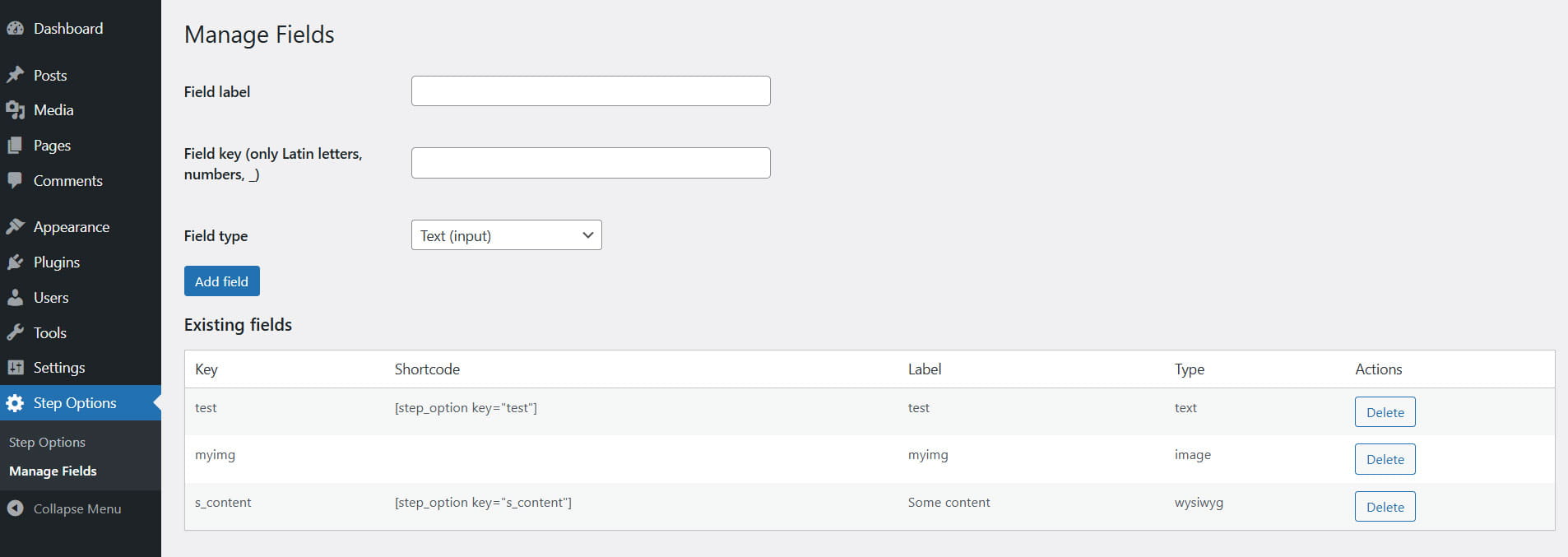
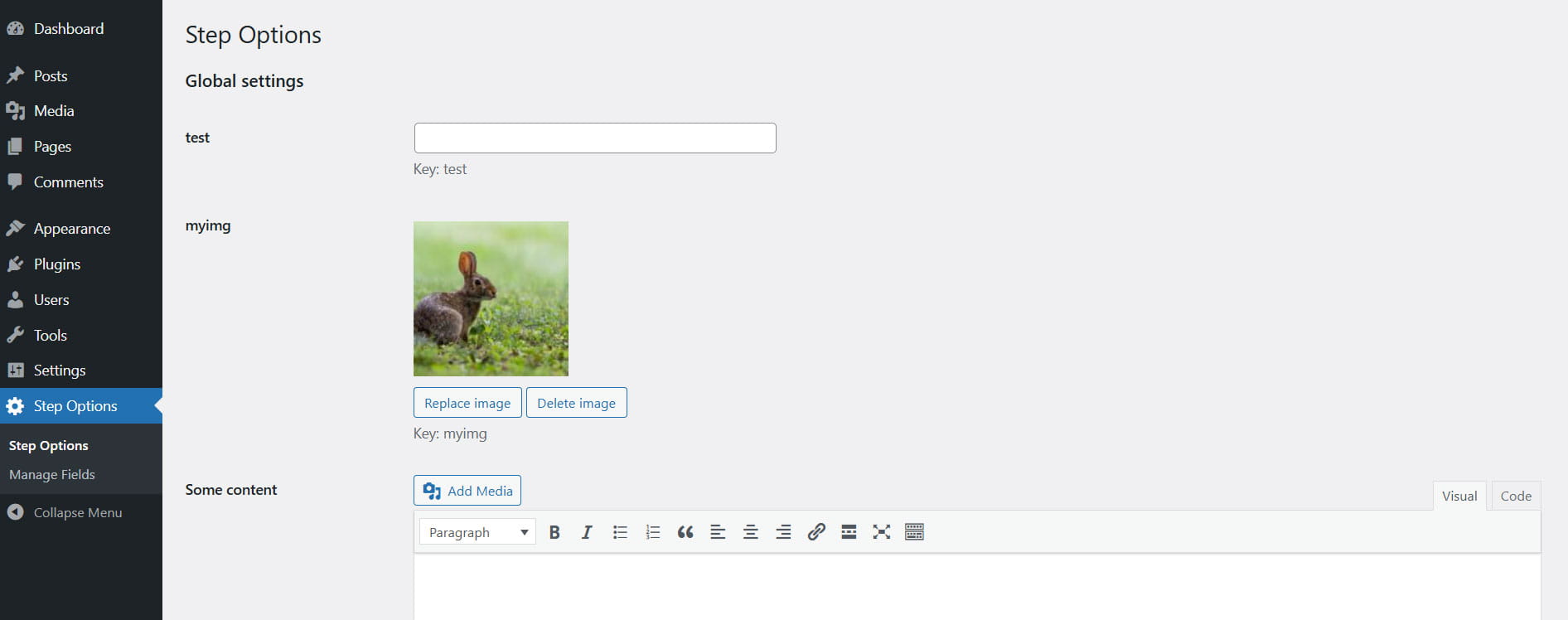
The plugin in the admin panel looks like this
Installation
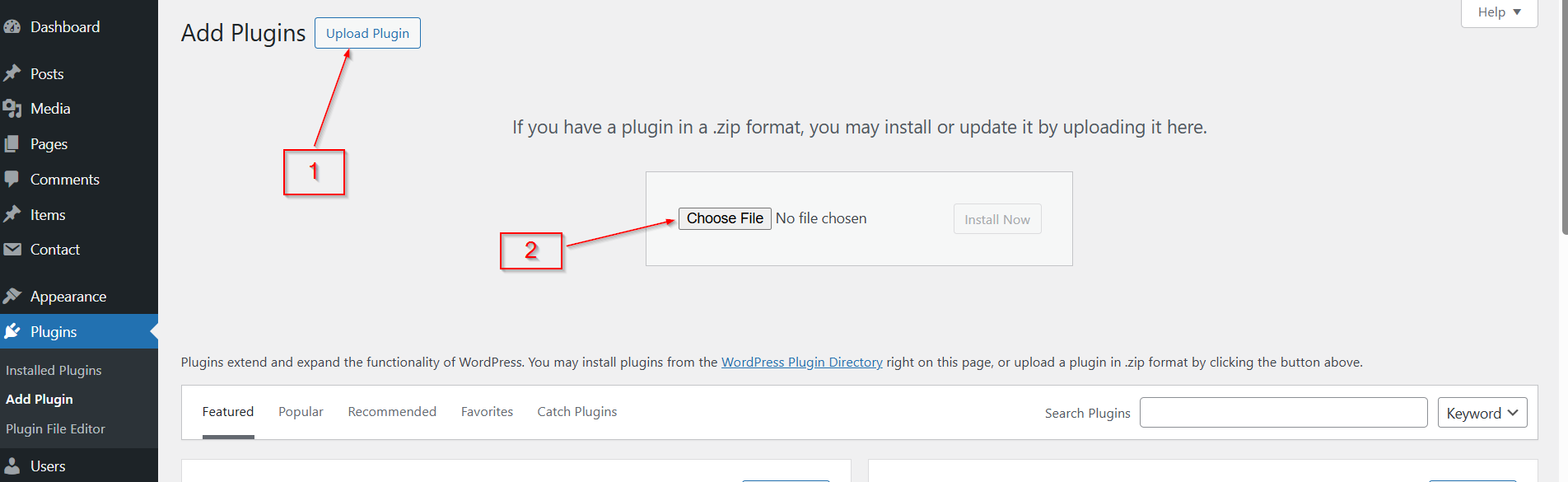
Upload the plugin zip archive using your site’s admin panel.
Usage
Adding Fields
- Go to Step Options → Manage Fields
- Fill in:
- Field Key — unique identifier (latin letters, numbers, underscore only)
- Field Label — display name shown in the admin
- Field Type — choose from: text, textarea, wysiwyg, image
- Click Add Field
Filling Values
- Go to Step Options (main settings page)
- Fill in the newly created fields
- Click Save Changes
Output Values in Theme Templates
<?php
// Simple text, textarea, wysiwyg
echo get_step_option('site_slogan');

// With default fallback
echo get_step_option('footer_text', '© 2026 My Site');

// For images — returns attachment ID
$logo_id = get_step_option('site_logo');
if ($logo_id) {
    echo wp_get_attachment_image($logo_id, 'medium', false, ['class' => 'site-logo']);
}

// Convenient image helper functions
echo get_step_option_image_url('site_logo', 'full');     // full image URL
echo get_step_option_image_url('site_logo');     // full is the default value

echo get_step_option_image('site_logo', 'thumbnail');    // ready <img> tag
?>
Output via Shortcode
[step_option key="site_slogan"]
[step_option key="about_text"]
[step_option key="site_logo"]   // outputs the attachment ID (not the image!)
Helpful Image Functions
<?php
// Image URL (sizes: thumbnail, medium, large, full)
get_step_option_image_url('header_background', 'large');

// Ready <img> tag with custom attributes
get_step_option_image('site_logo', 'medium', [
    'class'   => 'logo',
    'alt'     => 'Company Logo',
    'loading' => 'lazy'
]);
?>
It’s considered good practice to wrap third-party functions in your template with an additional check for their existence. This will protect you from unexpected errors if you disable the plugin or copy your code from the template to a project that doesn’t use the Step Options plugin.
if( function_exists('get_step_option') ) {
  echo get_step_option('site_slogan');
}
Even if the plugin is free, you can still thank the developer if the plugin was useful to you.

Other ways to donate are here
The current version of the plugin is 1.0.0
The plugin has been tested on WordPress version 6.9
Minimum PHP version — 8.0

Similar posts:
-
How to Remove the jQuery Migrate Script from WordPress
If your WordPress project uses jQuery, then by default, WordPress also loads the jQuery Migrate script along with it. In 99% of cases, you don’t actually need this script...
-
WordPress Classic Widget (Plugin) Google Maps
WS GMaps is a classic widget (plugin) Google Maps for WordPress CMS. The widget allows you to set multiple points on the map. In addition, there can be several widgets on...
-
How to Remove the "Website" Field from the WordPress Comment Form
By default, WordPress includes a "Website" or "URL" field in its comment form. While this may be useful in some cases, it often attracts spammers who leave low-quality co...
Leave a Reply