



How to Remove the jQuery Migrate Script from WordPress
If your WordPress project uses jQuery, then by default, WordPress also loads the jQuery Migrate script along with it. In 99% of cases, you don’t actually need this script. jQuery Migrate restores support for outdated features that have already been removed from the main jQuery library.
You can determine whether jQuery Migrate is loaded by checking for a message in your browser’s console

or by inspecting the HTML code of your website.
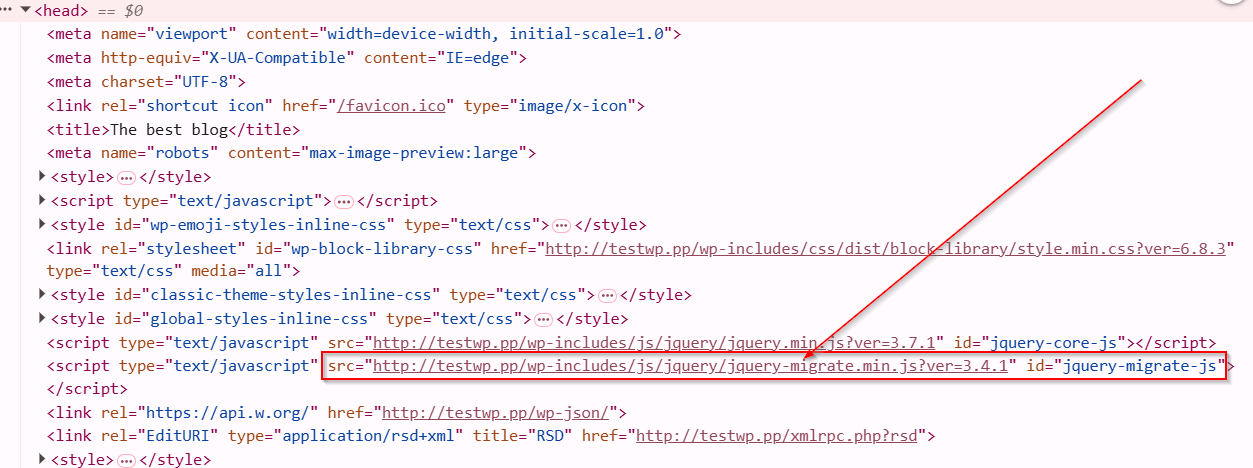
In most cases, the jQuery Migrate script doesn’t do anything useful and only adds extra load to your website, increasing the page loading time. This negatively affects user experience and can also harm your SEO. You can read more about how loading speed affects SEO in our related article — “Why Website Loading Speed Matters for SEO”.
There are several ways to disable the jQuery Migrate script. Personally, I prefer the method that doesn’t require any third-party plugins — simply by adding a small piece of code to your theme’s functions.php file.
PHP
// functions.php

/**
 * delete jquery-migrate
 */
add_action('wp_default_scripts', function( $scripts ) {
    if ( ! empty( $scripts->registered['jquery'] ) ) {
        $scripts->registered['jquery']->deps = array_diff(
            $scripts->registered['jquery']->deps,
            ['jquery-migrate']
        );
    }
});
The WordPress CMS is a great tool, but WordPress itself and its plugins often include unnecessary scripts and styles, thereby slowing down the site’s loading time. This, in turn, negatively impacts SEO. Therefore, you need to be careful about what and how you include. And in cases like jQuery Migrate, optimization is essential.

Similar posts:
-
Joomla Google Maps Module
StepMap is a free Google maps module for Joomla. This module is designed for Joomla 6. However, it also works on Joomla 5. The module was not tested on low versions of th...
-
How to Send HTML Form Data to Email Using PHP
Sending a form to email is an important and common way of communicating with a web resource user. Let's write a simple form for sending data to email using the PHP mail()...
-
Internal Linking on Websites
Internal linking refers to the practice of connecting pages within the same website using hyperlinks. This strategy plays a crucial role in both search engine optimizatio...
Excellent web site. Lots of helpful info here. I am sending it to a few friends ans additionally sharing in delicious. And certainly, thank you for your sweat!